

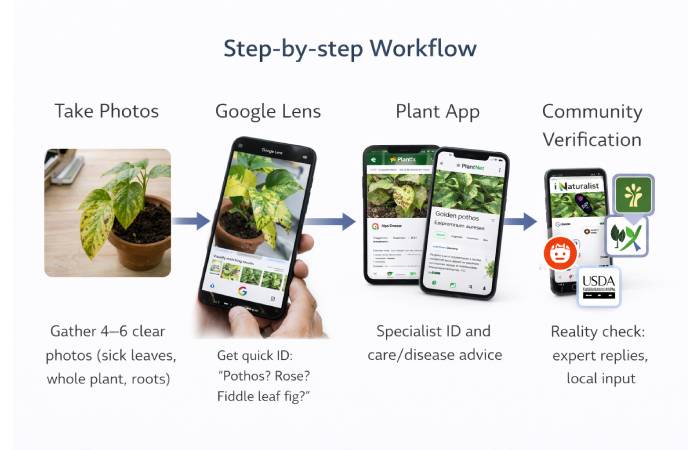
Search Live – Modern image-search tools pair your phone camera with large image databases and AI to find visually matching plants and common diseases. Google Lens is the fastest way to get a candidate identification; specialist plant apps add care instructions and disease-diagnosis tools; community platforms and extension services provide verification and local advice. Use all three together for reliable results.
Table of Contents
Full guide — step-by-step
Below is a practical, professional, and field-tested workflow you can follow the moment you notice a problem.
1) Prepare: gather what you’ll need
- Phone with camera (good battery)
- Small scissors or pruners (for sampling dead leaves)
- Clear natural light (avoid backlight)
- Plain background (white paper helps)
- A notebook or phone note to record observations (when issue started, watering schedule, fertiliser)
Why: good photos and simple notes make image-search and diagnosis far more accurate.
2) Take the right photos — exactly what to capture
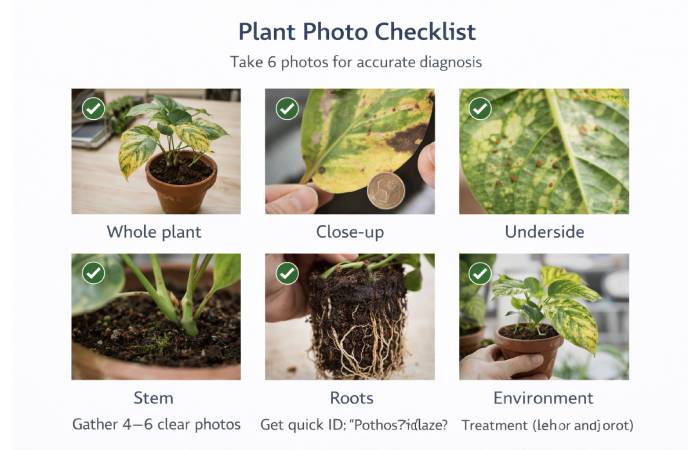
For best AI and human diagnosis, take 6 photos:
- Whole plant (shows overall pattern, size, posture)
- Close-up of affected leaf/area (one or two leaves showing symptoms)
- Underside of leaf (pests and eggs often hide here)
- Stem base & soil surface (root fungus, gnats)
- Roots (if you can) — gently lift the plant (only if safe)
- Environment shot (light level, nearby plants)
Tips: use natural, even lighting; keep the camera steady; include a coin or ruler for scale if helpful. Google support notes that using clear photos improves Lens results.
3) First pass: quick ID with Google Lens (fast & free)
How to:
- Open Google app or Google Photos.
- Tap the camera / Lens icon.
- Point at the plant photo (or upload from gallery).
- Review the suggested species and “visually similar” images.
Why: Google Lens is fast and broad — excellent for quick genus/species candidates and immediate “is this a rose / fiddle leaf fig / pothos?” answers. Use Lens as your first filter, not the final word.
4) Second pass: specialized plant ID and care apps
If Lens gives a candidate, run the same photo through 1–2 specialist apps to get species-specific care and disease suggestions.
Top apps to try (quick comparison below):
- PlantNet / Pl@ntNet — academic, plant-science focused (free). Great for wild plants.
- iNaturalist / Seek — community + science; best for verification and range info.
- PictureThis — user-friendly, good for houseplants (freemium).
- Plantix / Agrio — disease diagnosis oriented (agriculture focus). Use for damaged leaves and pathogens.
How to use them: upload the same best-quality close-up photo, read the suggested diagnoses, and note the top 2–3 matches.
5) Diagnose disease vs stress vs pests
Interpretation strategy:
- If multiple apps and Lens suggest the same species + same disease → high confidence.
- If apps disagree (disease vs nutrient deficiency), check symptoms list: spots, rings, necrosis, yellowing patterns, wilting, pests visible. Soil and watering notes help resolve ambiguity.
Quick rule-of-thumb:
- Spots, rings, necrotic patches → possible fungal/bacterial disease.
- Uniform yellowing starting at margins or veins → nutrient deficiency or overwatering.
- Holes, chewed edges, visible bugs → insect pests.
- Wilt with dry soil → underwatering; wilt with wet soil → root rot.
When in doubt, revert to community verification (iNaturalist or horticulture subreddit).
6) Verify with human expertise (community + extension)
If multiple AI outputs conflict, post the photos to:
- iNaturalist (community + experts).
- Reddit r/plantclinic or r/houseplants (fast replies, hobbyist-level).
- Local extension service (most reliable for region-specific pests/diseases).
Include: plant type, symptoms, watering/fertiliser history, photos. Community input is usually quick and points to the correct treatment in most cases.
7) Fix with targeted actions (safest first)
Follow the “least invasive first” rule:
If pests (aphids, spider mites, caterpillars):
- Isolate the plant.
- Wipe leaves with mild soap solution (1 tsp dish soap / 1 L water).
- Use insecticidal soap or neem oil for indoor plants.
- For heavy infestations consider targeted pesticides (follow label).
If fungal disease (spots, powdery mildew):
- Remove badly infected leaves and dispose (do not compost).
- Improve air circulation and light.
- Use copper or sulfur fungicides only if needed (follow label).
So, If nutrient deficiency (yellowing, specific pattern):
- Confirm via soil test if possible.
- Use balanced houseplant fertilizer or targeted micronutrient (iron chelate for chlorosis).
If root rot/overwatering:
- Remove plant, trim rotten roots, repot in fresh, fast-draining soil.
- Reduce watering frequency and improve drainage.
Always read labels and safety info for sprays; wear gloves and follow instructions.
8) Monitor & document
After treatment, document:
- Date of action
- What you did
- New photo every 5–7 days
Most plant problems take 2–6 weeks to show clear recovery or failure. If no improvement after 2–3 cycles of treatment, escalate to an expert.
App comparison table
| App / Tool | Best for | Cost model | Strengths | Limitations |
| Google Lens | Quick species ID + similar images | Free | Fast, wide coverage, built into Google | Generalist — not always disease-specific. |
| PlantNet | Wild plant identification | Free | Academic database, good for flora | Less tuned to houseplants |
| iNaturalist / Seek | Community verification, range data | Free | Expert community, record keeping | Slower response for urgent issues. |
| PictureThis | Houseplant ID + care | Freemium | User friendly, care tips | Accuracy varies; paywall for features. |
| Plantix / Agrio | Disease diagnosis (agriculture) | Freemium / paid | Focus on pathogens, treatment suggestions | Geared to crops but good for leaf symptoms. |
| PlantSnap | Broad plant database | Freemium | Large database, quick IDs | Mixed accuracy in tests; paywall limits free use. |
Troubleshooting checklist (10-point)
Before you declare it hopeless, run this checklist:
- Is the plant receiving appropriate light? (compare with species care)
- Is the soil wet, damp, or dry? (feel 2–3 cm down)
- Any visible pests (look under leaves)?
- Recent fertiliser changes?
- Any drafts / extreme temps?
- Has watering frequency changed?
- Any new plants nearby (pest source)?
- Is potting mix compacted or draining poorly?
- Do roots look healthy (white/pale vs brown/rotten)?
- Did AI and human ID agree on likely cause?
If more than 3 answers indicate poor environment (light, water, soil), fix those first — environment issues cause most houseplant declines.
Advanced tips: getting lab-quality results from your phone
- Use macro mode or very close focus for small pests and spores.
- Take photos from multiple angles.
- Use a plain background (white paper) for better AI matching. Google Photos support suggests Lens from the app or gallery gives better results with good photos.
Privacy & data notes (be smart)
- Many plant apps upload photos to cloud servers to run identification; check privacy policy if you’re sharing images of private property.
- When posting to community sites, avoid showing addresses or sensitive info in photos.
When to call a pro
- If the plant is valuable and problem is severe (large tree, specimen plant).
- If root rot covers >50% roots or plant is wilting badly.
- Suspected regulated pests (insects/diseases that may require quarantine).
- If you suspect chemical exposure or toxic household contamination.
Local extension services (university extension) are free and excellent for region-specific advice — use them when community input is unclear.
Real workflows
A — Quick houseplant rescue (30–60 minutes)
- Take good photos (whole + close up).
- Use Google Lens for species name.
- Open PictureThis / PlantSnap for care tips & likely disease.
- Isolate plant and apply the least invasive fix (clean leaves / adjust water).
- Monitor weekly.
B — Garden/vegetable problem (best for crops)
- Photo of affected leaf/plant and soil.
- Use Plantix / Agrio for disease diagnosis.
- If Plantix suggests pathogen, follow organic/approved pesticide guidance; contact local extension for chemical options.
- Crop: remove infected plants if advised to prevent spread.
C — Wild plant ID for foraging or removal
- Use PlantNet and iNaturalist for scientific ID and range verification.
Evidence & accuracy — what to expect
Multiple user tests and reviews show that accuracy varies by app and plant type: generalist tools (Lens, PlantSnap) are fast but sometimes less precise; academic/community tools (PlantNet, iNaturalist) are conservative but reliable for verification. For disease diagnosis, dedicated tools (Plantix, Agrio) perform well on crop leaves and obvious fungal/bacterial symptoms. Use two sources — AI + human community — for the best result.
FAQ
Q: Can I fix my plant using only Google Lens?
A: Google Lens gives quick species suggestions but is not designed for disease diagnosis. Combine Lens with a specialist app (Plantix/PictureThis) and community verification for reliable fixes.
Q: Which app is best & free for plant ID?
A: PlantNet and iNaturalist are top free, science-oriented options; Google Lens is free and excellent for a fast first pass.
Q: My plant is dying — should I repot or prune first?
A: Diagnose cause first (root rot vs pests). If root rot, repot and trim rotten roots. If pests or foliar disease, prune infected leaves first and treat foliage. Use the “least invasive first” approach.
Q: How accurate are disease diagnosis apps?
A: Accuracy depends on photo quality and symptom stage — apps like Plantix are strong on crop leaf diseases. Always verify with a human expert if stakes are high.
Final conclusion
If you’re asking “tell me how to use search live to fix my plant,” the smartest approach is a quick three-step loop: (1) capture high-quality photos, (2) run them through Google Lens for a fast ID and then through specialist plant apps like Plantix / PlantNet / iNaturalist for diagnosis and care, and (3) verify with community experts or extension services before you apply treatments. This mix of live search + specialist diagnosis + human verification is the fastest, safest, and most repeatable way to fix most plant problems.